
Why landing page variants quietly break conversion reporting
“Landing page canonicalization” sounds like a technical SEO detail, but in performance marketing it often becomes a data trap. The same page can be recorded as multiple different URLs across ad platforms, web analytics, tag managers, and CRMs. When that happens, clicks, sessions, leads, and revenue no longer line up—even if the underlying customer journey is fine.
The result is familiar: paid social says it drove the lead, analytics attributes the session to “direct,” the CRM shows a different source, and your dashboard adds everything up inconsistently. The common cause is URL variability: UTMs, redirects, AMP versions, trailing slashes, lowercase/uppercase differences, and query parameters that should be treated as equivalent but aren’t.
How URL canonicalization fragments data across systems
Most teams assume a “landing page” is a stable identifier. In practice, platforms store different URL fields and apply different normalization rules. A few typical mismatches:
- Ads platforms may store the final URL, the display URL, or a resolved URL after redirects. Some preserve query parameters, others shorten or decode them.
- Analytics tools often split “page path” and “query string,” may treat trailing slashes as different pages, and may apply their own URL parameter exclusions.
- Tag managers and pixels can fire with the browser’s current URL, not the originally clicked URL—especially after redirects, consent flows, or single-page app route changes.
- CRM and form tools frequently store a “referrer” or hidden field captured at submission time, which can differ from the first landing page in analytics.
Once each system has its own version of “the landing page,” your downstream reporting inherits that fragmentation. It becomes hard to answer basic questions like which campaigns drive qualified leads from a specific page, or whether a landing page change improved conversion rate.
The most common URL variants that cause the trap
UTM and click ID parameters
UTMs are essential for attribution, but they also create many “unique” URLs that refer to the same content. Add click identifiers (gclid, fbclid, msclkid), affiliate parameters, email parameters, and experimentation parameters and you can end up with thousands of URL rows for one page. If one tool stores the full URL and another stores only the path, your joins and comparisons break.
Redirect chains and URL rewriting
Redirects happen for valid reasons: http to https, non-www to www, locale routing, or campaign vanity URLs. But redirects change what systems capture. An ad click might land on /lp and be redirected to /landing-page/. Analytics might log the destination, while the CRM logs the original URL in a hidden field. If you later aggregate by landing page without normalization, those conversions split.
AMP versions and alternate templates
AMP pages and other alternate templates can produce parallel URLs for effectively the same landing experience. Some platforms report the AMP URL, others the canonical non-AMP URL. If you attribute conversions to “top landing pages” without consolidating these, you may misread which page is actually performing.
Trailing slashes, index pages, and casing
/product vs /product/ vs /product/index.html can appear as separate pages depending on server behavior and analytics configuration. The same goes for uppercase vs lowercase paths. These are subtle errors because each variant may have meaningful volume—just not enough to trigger alarms.
Subdomains, locales, and cross-domain hops
Landing pages often live on different subdomains (e.g., www vs go) or pass through third-party scheduling and checkout flows. If cross-domain tracking isn’t consistent, the “first landing page” and the “conversion page” can lose continuity. Even when tracking is correct, analytics might store the landing page on one domain while CRM stores the form page on another.
Symptoms that indicate canonicalization problems
- Your “top landing pages” report contains many near-duplicates.
- Channel totals match, but landing page totals don’t.
- Paid campaigns show strong click volume but weak or inconsistent attributed sessions.
- CRM source fields disagree with analytics source/medium more than expected.
- Dashboards require constant manual URL cleaning in spreadsheets.
These issues are often mistaken for attribution model debates. In reality, you may be comparing different identifiers for the same page.
How to rebuild a single source of truth for landing pages
1) Define what “canonical landing page” means for reporting
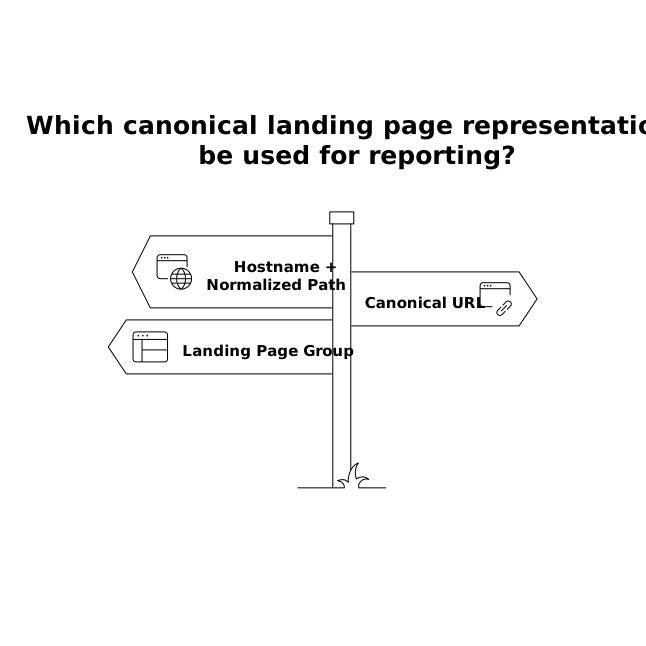
Canonicalization for analytics is a business definition as much as a technical one. Decide which representation you want to use as the stable key, such as:
- Hostname + normalized path (recommended for most reporting)
- Canonical URL (if reliably available from page metadata or CMS exports)
- Landing page group (e.g., map multiple URLs to one concept like “Pricing”)
Document edge cases: AMP handling, locale handling, whether to keep or discard certain parameters (e.g., keep ?plan= but remove fbclid), and whether trailing slashes should be removed.
2) Normalize URLs consistently before joining datasets
The mistake is cleaning URLs in each dashboard differently. Instead, apply a shared set of transformations upstream so every dataset uses the same landing page key. Typical transformations include:
- Force lowercase (if your site treats paths case-insensitively)
- Remove protocol (http/https) and normalize hostname (www vs non-www)
- Remove trailing slashes (or add them—just be consistent)
- Strip known non-informative parameters (gclid, fbclid, msclkid, utm_*)
- Resolve known redirects via mapping tables (short URL → final canonical path)
A practical approach is to maintain a parameter allowlist/denylist and a redirect mapping table that can be updated without changing every report.
3) Preserve both raw and canonical fields
Canonicalization should not destroy information. Keep:
- raw_landing_url (exactly as captured)
- canonical_landing_page (your normalized key)
- canonicalization_notes or a rule ID (so analysts can audit changes)
This makes debugging faster when a campaign team asks, “Why did this URL roll up under that page?”
4) Align ads, analytics, and CRM around the same key
Even with perfect URL cleaning, you still need a consistent join strategy. Map your conversions to the canonical landing page using the same logic in every dataset feeding your BI layer. This is where marketing data infrastructure matters: it’s less about collecting more data and more about applying the same definitions everywhere.
Teams often use Funnel.io to collect data from ad platforms, analytics, and CRM tools, then standardize fields and transformations so the canonical landing page definition is applied consistently before reporting. That reduces the need for one-off cleaning steps inside dashboards and helps keep “landing page” meaning the same thing across stakeholders.
5) Add governance so the problem doesn’t return
Canonicalization regressions happen when new parameters appear (new ad networks, new experimentation tools), redirects change, or teams launch new subdomains. Add lightweight checks:
- Weekly monitoring for new high-volume parameters
- Alerts when near-duplicate landing pages spike
- Versioned transformation rules with clear owners
If you already run periodic audits of what customers ask for versus what drives outcomes, a similar mindset helps here: treat URL variability as “negative demand” in your data layer—noise that creates work without improving insight. The same discipline used in a negative demand audit can be applied to analytics definitions to prevent ongoing fragmentation.
What improves immediately once landing pages are canonicalized
- Landing page conversion rate becomes stable and comparable over time.
- Channel and campaign reporting aligns more cleanly with CRM outcomes.
- Experimentation results are easier to interpret because page identity is consistent.
- Dashboards become simpler because cleaning is upstream and repeatable.
Canonicalization is not a one-time cleanup; it’s a durable definition that turns landing pages into a reliable dimension for attribution, budgeting, and funnel analysis.